How does print and apply labelling work?
A print and apply labeller identifies the pack, receives or selects the correct data, prints a label, presents it to the applicator, applies it and confirms the required result before the pack is released.
The process is a controlled sequence, not only a printer beside a conveyor
Print and apply labelling combines data, printing, media handling, mechanical application and line control in one sequence. The product trigger starts only one part of the process. A reliable installation also maintains the identity of the pack, confirms that the correct template and data are active, controls when the applicator can move, records success or failure and prevents an uncertain pack from continuing as though the cycle completed.
The exact method changes with tamp, wipe, blow, corner-wrap or pallet application, but the control principle remains the same: every physical movement must stay linked to the intended label record.
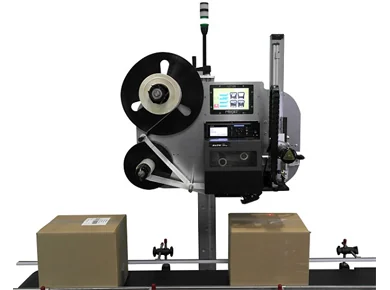
Six stages in a normal print-and-apply cycle
Detect and identify the pack
A sensor or upstream control creates the trigger and, where required, associates it with a product, job, order or pallet record.
Select data and template
The controller confirms the approved layout and obtains the variable fields from the agreed source.
Print and present the label
The print engine produces the label and separates it from the liner so the applicator can hold or wipe it.
Apply to the intended surface
The applicator moves or the product passes the peel edge under controlled position, speed and clearance.
Confirm the required evidence
The system may confirm motion, label presence, a barcode read, an expected-data match or another agreed inspection.
Release or contain the pack
The line continues only under the agreed success rule; a failed or uncertain pack follows the defined recovery route.
Where projects usually lose control
Pack identity is not retained
The label record is selected correctly, but product accumulation or a manual intervention breaks the link to the physical pack.
Mechanical success is assumed
A print-complete signal is treated as proof that the label reached the correct surface.
Recovery is undefined
Operators can reprint or restart without knowing which steps already occurred, creating duplicates or unlabelled packs.
Information needed to describe the sequence
| Trigger | What detects the pack, when the trigger occurs and how duplicate triggers are prevented. |
|---|---|
| Identity | How the physical pack remains associated with the job, order, serial or pallet record. |
| Data source | Which system owns each field and what happens if data is missing, late or invalid. |
| Application | Pack movement, apply face, distance, surface, product gap and applicator return condition. |
| Evidence | Which success checks are required and where they take place. |
| Recovery | Line stop, reject, hold, reprint, retry, alarm reset and duplicate-prevention rules. |
Questions answered on this page
Each answer is written to remain clear when read on its own and to show the variables that must be confirmed for a real production line.
What happens between the product sensor and label application?
The controller validates that a cycle is available, identifies the pack, selects the correct template and data, commands the print and waits for the label to be ready. Only then should the applicator move or the product enter the application position. The sequence also needs timeouts and fault states so a missing label or late record does not become an uncontrolled cycle.
When is the variable data printed?
Variable data is normally printed after the relevant pack or job has been identified and before the application event. The exact timing depends on data availability, label length, print time, queue design and product gap. Printing too early can make sequence errors harder to detect; printing too late can leave insufficient time to complete the cycle.
How does the label move from the liner to the applicator?
The label web changes direction around a peel edge so the label separates from its backing. A tamp pad, vacuum surface, wipe mechanism or other applicator receives the exposed label while the backing liner is taken up. Stable web tension, label gaps, sensor calibration and clean media paths are therefore part of application reliability.
Does the product need to stop for the label to be applied?
Not always. A wipe application can use the motion of a stable product, while tamp or complex placement may require an indexed position or tightly controlled moving target. The decision depends on label size, surface, speed, placement tolerance, apply distance and the applicator cycle rather than a general preference for stopped or moving products.
How does the machine know the correct pack received the label?
The system must preserve pack identity through detection, data selection, printing, application and any inspection. That can involve a controlled queue, upstream job signal, encoder position, scanner result or pallet record. A print-complete signal alone proves only that a label was printed, not which pack received it.
What happens when one stage of the cycle does not complete?
The line should enter a defined fault or containment state. The controller should record the last confirmed stage, keep the affected pack identifiable and restrict reprint or retry until the operator knows whether a physical label exists. Acceptance testing should include these interrupted states, not only repeated successful cycles.
Related print and apply resources
Continue with the page that owns the next decision in the project.
Map the sequence on the real line
Send a line video, trigger position, product gap, data source and required success evidence so the complete operating sequence can be reviewed.