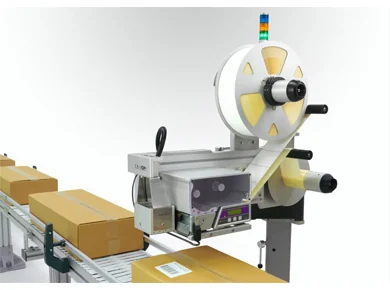
Barcode label printer applicator guide

Barcode printer applicators are specified around scan reliability. The label must print clearly, apply in the right place and carry the right live data for every pack.

Guides

What this page helps you decide

Barcode printer applicators are specified around scan reliability. The label must print clearly, apply in the right place and carry the right live data for every pack.

  • Clarify the label, barcode and data requirement before machine selection.
  • Choose the right applicator style for the pack movement and apply face.
  • Prepare better information for quotation, integration and installation.
Barcode label printer applicator guide

Specification points

These are the areas that usually decide whether a print and apply labeller runs smoothly on the line.

Specify the barcode before the machine

  • Confirm whether the barcode is GS1-128, EAN, Code 128, QR or another customer format.
  • Check quiet zones, label dimensions, x-dimension, print resolution and any verifier requirement.
  • Provide a sample label or artwork file so the template can be reviewed early.

Control the pack at the apply point

  • Barcode labels are only useful if they are easy to scan after application.
  • The product needs a stable face, consistent height and enough gap for the print/apply cycle.
  • Photoeyes, encoders and reject signals can be added where the line needs confirmation of successful labelling.

Choose the right print method

  • Direct thermal labels are often used for shorter-life logistics labels.
  • Thermal transfer can be selected where more durable print is needed or the label stock requires a ribbon.
  • Print resolution should be selected based on barcode size, small text and scan expectations.

Questions buyers ask

Quick answers for planning the right labelling configuration.

What does a barcode label printer applicator do?

It prints a barcode or variable data label and applies it automatically to a product, case, carton or pallet.

Can it print QR codes?

Yes, QR codes can be printed where the template and print resolution are suitable.

Can the printer get data from a database?

Yes, systems can be specified to receive data from a database, ERP, WMS, scanner or PLC depending on the project.

Need this matched to a real line?

Send label size, pack dimensions, apply position, line speed and data source. Lancing UK can help specify a practical print and apply format.

Call nowContact us